You need to send a set of documents to someone who isn’t very technical, and you’re not sure they can open 7Z. A self-extracting archive (SFX) is an .exe with the compressed data built in: the recipient runs it, picks a folder, and the files come out.
Creating one in GenZip
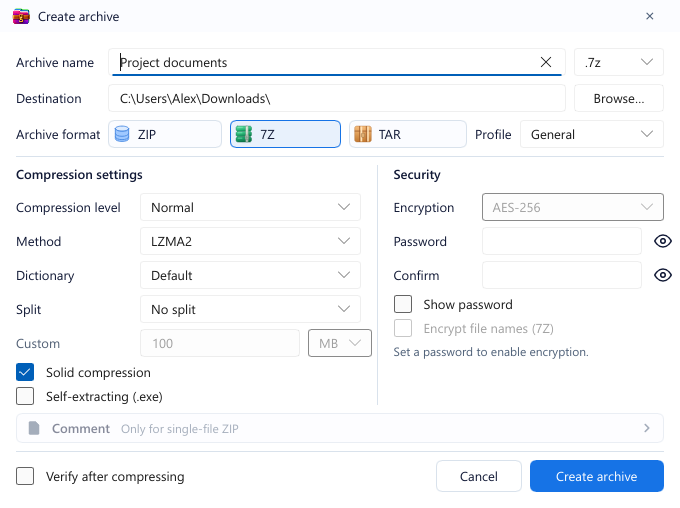
- Open Create archive and choose 7Z.
- In the Compression settings column, tick Self-extracting (.exe). The extension changes to
.exe. - Pick a profile, set a password if needed, then click Create archive.
GenZip combines the 7Z data with 7-Zip’s official self-extractor module, not a custom or modified one.
Limits: 7Z only, and it can’t be split into volumes.
When to use it
- The recipient uses Windows and may not have a 7Z-capable archiver.
- Distributing internal documents to many people who should just click once.
- You want 7Z’s strong compression while keeping it easy to open.
When not to
- Sending to strangers or by email. Many email services block
.exeattachments, and careful recipients will (rightly) hesitate to run an unknown.exe. A plain.zipor.7zis friendlier. - Recipients on macOS, Linux or phones. An
.exeonly runs on Windows. - When you don’t need it. If the recipient already has an archiver, a
.7zis enough.
A safety reminder
A self-extractor is a runnable program, so treat any self-extracting .exe you receive like any other .exe: run it only if you trust the sender.
See also: All create options.