Adding a password to an archive is an easy way to send private documents. But “has a password” doesn’t automatically mean safe: it depends on the encryption you choose and how you share the password.
Setting a password in GenZip
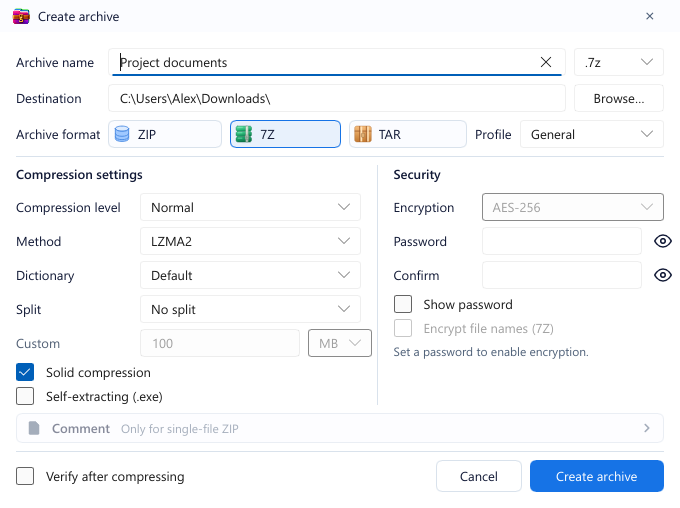
In the Create archive dialog, look at the Security column on the right:
- Enter Password and Confirm. Click the eye icon or tick Show password to check what you typed.
- Once a password is set, the Encryption box becomes available. Pick the encryption type (see below).
- For 7Z, also tick Encrypt file names (7Z) if you don’t want others to see the list of files inside.
- Turn on Verify after compressing: GenZip re-tests the new archive with the same password, so you know you can open it again.
ZipCrypto or AES-256?
For ZIP, GenZip offers ZipCrypto or AES-256. For 7Z, encryption is always AES-256.
- AES-256 is strong, modern encryption. Use it for anything that matters.
- ZipCrypto is ZIP’s legacy encryption and is known to be weak. Use it only when the recipient must open the file with an old tool that lacks AES support. Don’t use ZipCrypto for sensitive data.
Are file names exposed?
Many people miss this:
- A password-protected ZIP still shows file names. Anyone who opens it sees a list like
Contract-2026.pdforPayroll.xlsx; they just can’t read the contents. - 7Z with Encrypt file names encrypts the file list too. Without the password, nobody can tell what is inside.
If the file names alone are sensitive, use 7Z + AES-256 + Encrypt file names.
Common mistakes
- Sending the password in the same email as the file. Anyone who reads the email can open the file. Share the password through another channel: a text message or a call.
- Short passwords. No encryption can save a password like
123456. Use a long phrase that is easy for you to remember but hard to guess. - Forgetting the password. Nobody, GenZip included, can recover data from an AES-256 archive without the password. Keep it somewhere safe, such as a password manager.
See also: Passwords and encryption.